The algorithms that search engines use are always changing, and your SEO methods should be updated accordingly. Your website’s on-page search engine optimization (SEO) continues to be an essential component in ensuring that it ranks highly in search engine results.
In the year 2025, Google continues to place a high priority on the user experience, the quality of the material, and the technical framework. Your web pages will remain optimized, crawlable, and competitive if you use this blog’s full on-page SEO checklist for the year 2025.
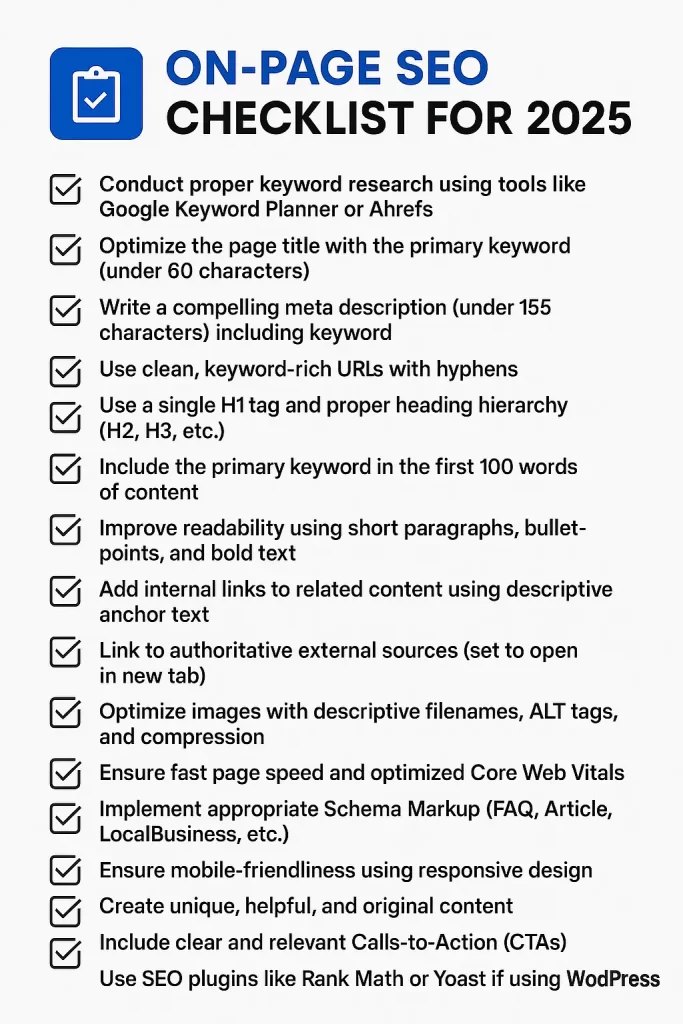
Conduct Thorough Keyword Research to Begin
Research on keywords serves as the basis for every good search engine optimization plan. This enables you to gain a better understanding of what your audience is looking for and how you can fulfill their requirements. Your ability to generate content that ranks higher on search engines and attracts targeted visitors to your website is directly correlated to your ability to find the appropriate keywords.
In order to locate high-volume keywords that have low levels of competition and are connected to your niche, you should start by using tools such as Google Keyword Planner, SEMrush, or Ubersuggest. Whether consumers are looking for information, to make a purchase, or to compare items, it is important to focus on their search intent.
Long-tail keywords are very useful for attracting visitors who are highly relevant to the content being searched for and for increasing conversion rates. In order to gain further information, you should not neglect to examine the keyword strategies utilized by your competitors.
It is crucial to use keywords in a natural way and incorporate them into your titles, meta descriptions, headings, and content. Avoid overloading your material with keywords; instead, make sure it is user-friendly and valuable.
In the end, conducting sufficient keyword research is what paves the way for improved visibility, more engagement, and long-term success in your search engine optimization efforts.
Before diving into optimization, start by identifying your primary keyword and related secondary keywords.
- Use tools like Google Keyword Planner, Ahrefs, or Ubersuggest.
- Look for long-tail keywords with decent volume and low competition.
- Consider search intent — is the user looking to buy, learn, or navigate?
Tip: Target one main keyword per page and sprinkle related terms naturally.
Optimize Page Titles with Keywords
In terms of both search engine optimization and user experience, page names are quite important. If you include pertinent keywords in your titles, search engines will have an easier time understanding your material, which will increase the likelihood that you will rank higher in the search results. In order to get the greatest possible impact, position the primary keyword close to the beginning of the title.
Maintain titles that are less than sixty characters in length to guarantee that they will display appropriately on search engine results pages (SERPs). In order to promote clicks, you should make them understandable, interesting, and pertinent. It is important to avoid keyword stuffing and to retain natural readability.
The title of a page that has been optimized not only raises the visibility of the page, but it also boosts the credibility of your website and the click-through rates, which in turn drives more organic traffic to your website.
Your title tag is one of the most important on-page SEO elements.
- Keep titles under 60 characters.
- Place the primary keyword as close to the beginning as possible.
- Make it clickable and relevant.
Example:
Bad: “Welcome to Our Website”
Good: “Affordable Web Design Services in Coimbatore – 2025”
Write Compelling Meta Descriptions
The meta descriptions of your page serve as the sales pitch for your page in the results of search engines. However, they have a significant impact on click-through rates, despite the fact that they do not directly affect rankings. Your target keyword should be included in a natural way in a meta description that is approximately 150–160 characters long (or more).
In order to encourage users to click, you should concentrate on providing a concise summary of the page’s information. In order to generate a sense of urgency and intrigue, you should make use of action words such as “discover,” “learn,” or “get.” It is important to avoid providing descriptions that are the same across multiple pages; each one should be distinct and pertinent.
Meta descriptions that are well-written have the potential to make your listing stand out, increase the amount of traffic it receives, and improve the overall effectiveness of your SEO by raising the amount of user engagement.
While not a ranking factor, a well-crafted meta description can increase your CTR (Click-Through Rate).
- Keep it under 155 characters.
- Include the main keyword naturally.
- Summarize the content persuasively.
Use Clean, Keyword-Rich URLs
SEO and user experience are both improved by a URL that is tidy and contains a lot of keywords. Because search engines rely on URLs to comprehend the content of a page, inserting keywords that are pertinent to the page increases its prominence. As an illustration, rather than using yourdomain.com/page?id=123, you should use yourdomain.com/seo-tips?
It is important to keep URLs brief, descriptive, and easy to read. The use of stop words, special characters, and digits that are not necessary should be avoided. In order to improve the readability of your text, use hyphens to separate words.
It is easier for users to explore your website and develop confidence when you utilize URLs that are consistent and well-structured. In addition, they increase the percentage of people who click through when they are shared on social media or in search results. A URL structure that is easy to understand helps improve indexing and long-term search engine optimization performance.
Your URL structure should be clear, short, and keyword-optimized.
- Avoid unnecessary parameters or numbers.
- Use hyphens (not underscores) to separate words.
- Include the main keyword in the slug.
Example:
www.example.com/on-page-seo-checklist-2025
Use One H1 Tag and Structure Other Headings Hierarchically
There should be only one H1 tag on each and every web page. The most important term should be included in this heading, which serves as your primary heading. It conveys the content of the page to both the person reading it and the search engine.
The H2 tags should be used for the main parts, and the H3 tags should be used for any points that fall under the various sections. The text you generate will be easier to read and comprehend as a result of this clear framework that is created.
By avoiding the usage of an excessive number of H1 tags, you can avoid confusing search engines. It is possible to improve the appearance of your website and its performance in search results by using a tidy header structure.
- Each page should have one H1 tag (your page title).
- Use H2s, H3s, and H4s to break content into digestible sections.
- Insert relevant keywords into headings where appropriate.
Optimize the First 100 Words
Particularly significant are the first one hundred words of your page. You should explain to folks what the content you are creating is about and make use of your primary keyword at this point.
Because search engines like Google look at this section first, you should make it understandable and helpful. Begin with a powerful sentence that not only captures the reader’s attention but also conveys the primary point.
Avoid filling up space with irrelevant or uninteresting content. To encourage readers to continue reading, you should get right to the point and make it entertaining!
In addition to keeping readers interested, a strong beginning assists your website to appear in search results.
Search engines put more weight on the first few lines of your content.
- Include your primary keyword in the first 100 words.
- Clearly state the purpose of the page.
- Avoid keyword stuffing — keep it natural.
Improve Readability and Formatting
It is equally as crucial to make your information clear and easy to read as it is to convey your message. In order to keep the reader interested and engaged, you should use short sentences, basic vocabulary, and straightforward paragraphs. The page will have a clear and easy-to-follow style if you break up large blocks of text with headings, bullet points, and spacing between different sections.
Choose a font size and style that is easy to read, and check to see that your information appears well on mobile devices as well as desktop computers.
When consumers are able to swiftly scan and comprehend the content you provide, they are more likely to remain for a longer period of time and to take action. Not only does clear formatting benefit readers, but it also boosts your search engine optimization effectiveness.
User experience is key. Google rewards content that’s easy to read.
- Use short paragraphs (2–3 sentences).
- Add bullet points, numbered lists, and bold text for scannability.
- Use tools like Hemingway Editor or Grammarly to check readability.
Bonus: Ensure it looks good on mobile.
Use Internal Linking Strategically
Increasing your search engine optimization (SEO) and directing users through your website is a smart approach to use internal linking. It entails linking one page of your website to another page that is pertinent to the topic at hand. In this way, search engines are able to explore your website more effectively, and it also reveals which pages are most significant.
In the process of writing content, you should seek opportunities to add connections to related blog articles, service pages, or product pages that are naturally occurring. Anchor text should be descriptive, meaning it should tell users what they will find when they click on the link. Linking to a phrase such as “learn more about on-page SEO” is an example of a better alternative to saying “click here.”
Enhancing the user experience, lowering bounce rates, and keeping users on your website for longer are all benefits of strategically implementing internal linking. In addition to this, it assists in passing link equity, which in turn provides your vital pages with a greater chance of ranking.
Ensure that the pages that are the most valuable to your website have a significant number of internal links connecting to them. In addition to improving your website’s search engine optimization (SEO), a well-planned internal linking structure also makes navigation simpler for consumers.
Internal links help distribute page authority and keep users engaged.
- Link to related blog posts or service pages.
- Use descriptive anchor text (not just “click here”).
- Don’t overdo it — 2–5 internal links per 1000 words is a good rule.
Add External Links to Authoritative Sources
Your content’s reputation and search engine optimization (SEO) will improve if you include external connections to authoritative websites.
When you make reference to reputable sources, such as websites run by the government, educational institutions, or well-known magazines, you demonstrate to search engines and readers that the content you provide has been thoroughly studied and can be relied upon.
In addition, users are able to verify facts and investigate topics that are connected via these linkages. If you want to keep people’s trust and make the user experience better, you should make sure that the external connections are current and useful.
In order to maintain a powerful and reliable online presence, quality outbound linking is essential.
Linking to credible sources helps build trust and context.
- Reference government sites, research studies, or trusted publications.
- Set external links to open in a new tab.
- Use nofollow for promotional or untrusted links.
Optimize Images for SEO
The performance and visibility of your website can both be improved by optimizing the photos on it. Make sure to use file names that are informative and alt text that contains keywords. You can reduce the amount of time it takes for photos to load by compressing them.
You should select the appropriate file format, such as JPEG or WebP. Ensure that mobile devices are responsive as well. These seemingly insignificant actions have a significant influence on both your search engine optimization and the user experience.
Images enhance user experience, but they must be optimized.
- Use descriptive file names (e.g., seo-checklist-2025.png).
- Add ALT tags with relevant keywords.
- Compress images to improve load times (use tools like TinyPNG).
Improve Page Speed and Core Web Vitals
Both search engine optimization and user satisfaction are dependent on page performance and core web vitals. A website that loads quickly has a lower bounce rate and maintains the interest of its visitors. The speed of your website can be increased by optimizing graphics, enabling browser caching, and utilizing a content delivery network (CDN).
Measurements such as the Largest Contentful Paint (LCP), the First Input Delay (FID), and the Cumulative Layout Shift (CLS) deserve your attention. To guarantee that your website satisfies Google’s performance standards and achieves higher ranks, you should execute performance audits on a regular basis utilizing tools such as Google PageSpeed Insights.
INP stands for “Interaction to Next Paint.”
Google has announced a new Core Web Vital measure called INP, which will take the place of FID beginning in March of 2024. INP provides a more comprehensive view by assessing the overall responsiveness of a page to user interactions, in contrast to FID, which only examined the latency of the initial interaction.
Then, now:
(An ancient metric) FID stands for “First Input Delay.”
In this new standard metric, INP stands for “Interaction to Next Paint.”
Google’s ranking algorithm factors in page load speed and Core Web Vitals.
- Use Google PageSpeed Insights to analyze performance.
- Optimize for:
- LCP (Largest Contentful Paint) under 2.5s
- FID (First Input Delay) under 100ms
- CLS (Cumulative Layout Shift) under 0.1
- LCP (Largest Contentful Paint) under 2.5s
- Minify CSS/JS, leverage caching, and consider using a CDN.
Use Schema Markup for Rich Results
Schema markup is structured data that is added to the code of your website in order to assist search engines in understanding the content of your website.
Rich results, such as star ratings, frequently asked questions, and event information, can be displayed in search listings, which increases both visibility and click-through rates. Schema use improves your search engine optimization and increases user engagement.
Schema markup helps search engines understand your content better.
- Add FAQPage, Article, or LocalBusiness schema as appropriate.
- Use tools like Google’s Structured Data Markup Helper or plugins like Rank Math or Yoast for WordPress.
- Test using Google’s Rich Results Test.
Ensure Mobile-Friendliness
As a matter of user experience and search engine optimization, it is crucial to make your website mobile-friendly.
Due to the fact that the majority of consumers use the internet on mobile devices, your website needs to be able to effortlessly adapt to different screen sizes. Employ a design that is responsive, fonts that are readable, and buttons that are simple to click. A website that is optimized for mobile devices has a lower bounce rate and higher engagement levels.
Due to the fact that it indexes mobile-first, Google also gives preference in search ranks to websites that are optimized for mobile use. It is important to do regular tests on your website using tools such as Google’s Mobile-Friendly Test to ensure that it functions properly on all devices.
Over 60% of web traffic comes from mobile in 2025.
- Use responsive design.
- Avoid intrusive interstitials (pop-ups).
- Test using Google’s Mobile-Friendly Test.
Create Unique and Helpful Content
Effective search engine optimization relies on material that is both original and helpful. Search engines give priority to unique content that provides users with content that is of genuine value.
Instead of focusing on content that is generic or duplicated, you should concentrate on addressing the individual needs of your audience, finding solutions to difficulties, or providing clear answers to issues. In order to differentiate yourself from others, incorporate your knowledge, ideas, and current information.
Content that is well-structured and useful helps to develop trust, encourages longer visits, and enhances the amount of sharing that occurs. Your brand will be positioned as an authority in your niche if you consistently produce good content. This will not only enhance your rankings but will also position your brand as an authority.
Google’s Helpful Content System prioritizes value-driven content.
- Avoid duplicating content from other websites.
- Focus on solving a user’s problem clearly and thoroughly.
- Use examples, visuals, or FAQs to increase usefulness.
Add a Clear CTA (Call-to-Action)
Visitors are directed to the next step, such as signing up, making a purchase, or getting in touch with you, by a very clear call to action (CTA).
Short and specific, it must to be positioned in a way that makes it easy to see. Put action words like “Get Started,” “Learn More,” and “Subscribe Now” in your marketing arsenal.
A compelling call to action (CTA) drives engagement and assists in converting site visitors into leads or customers. If you want the best results, you should always make sure that the call to action is aligned with the aim of your content.
Every page should guide the user to take action.
- Use CTAs like “Get a Free Quote,” “Download the Guide,” or “Contact Us.”
- Place them strategically: top, middle, and bottom of the content.
Keep Your Content Updated
When you update your material on a regular basis, you ensure that it continues to be accurate, current, and beneficial to your audience. Information that is out of current can be detrimental to your credibility and affect your ranks in search engines.
In order to demonstrate to search engines that your website is trustworthy and current, you should regularly update its statistics, links, and examples. User experience is improved by updated content, which also has the potential to increase search engine optimization performance by maintaining or improving presence in search results.
Create a timetable for reviewing and revising previous posts, particularly those that have performed well, in order to ensure that they remain optimized and in line with the most recent trends.
Fresh content ranks better. Make it a habit to:
- Revisit and update old posts regularly.
- Remove outdated data or dead links.
- Add recent stats or case studies.
Pro Tip: Set a content refresh reminder every 6 months.
Conclusions
The art of mastering on-page SEO in the year 2025 is about striking a balance between technical excellence and human value. Developing content that is well-structured, informative, and user-friendly while still conforming to Google’s ever-evolving ranking systems is the most important thing to do.
It is recommended that you begin using this on-page SEO checklist for 2025 as a regular audit tool, regardless of whether you are publishing a new post or refreshing an original one. The rankings, traffic, and conversions of your website will progressively improve if you maintain consistency.
FAQs
Update at least once every 6 months or whenever Google rolls out major algorithm changes.
Not necessarily. Prioritize based on your website’s goals and resources, but aim to cover as many as possible.
Yes — but context and intent matter more. Use keywords naturally and support them with semantically related phrases.